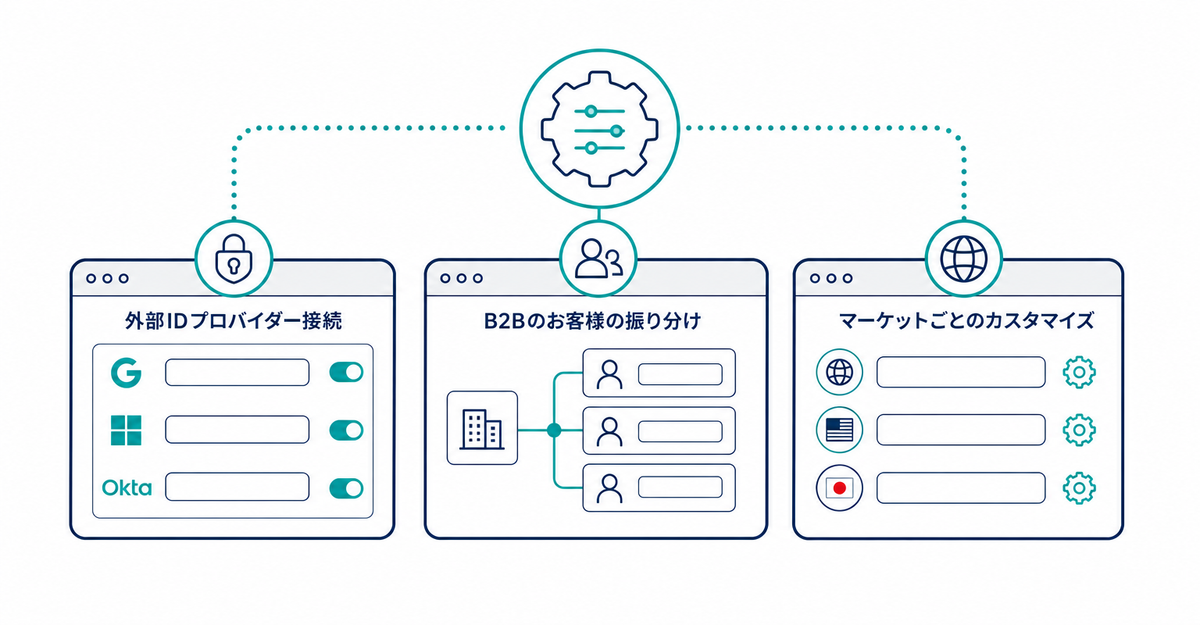
In short: Before a Shopify Plus store switches to new customer accounts, check three things: (1) the conditions for connecting an external identity provider for single sign-on, (2) how B2B customers are handled in new customer accounts, and (3) what you can customize on customer account pages for each market. Also check the six limitations that Shopify Help lists as things to check before upgrading.
Key points
- Connecting an external identity provider is available only to stores on the Shopify Plus plan, and it replaces the default login experience with single sign-on
- Legacy customer accounts can't be used for B2B customers and orders, so new customer accounts are required
- If you serve both B2C and B2B customers in the same store, the experience depends on whether the customer's email address is associated with a company location
- Market-specific customization of customer account pages is available only to stores on the Advanced or Plus plan
- Existing Multipass integrations on Shopify Plus keep working after the upgrade, and no action is required
What login feature is available only on the Shopify Plus plan?
Single sign-on with your own identity provider. When you connect an identity provider that supports OpenID Connect, customers log in to their store accounts by authenticating with that identity provider, and the default Shopify login page is no longer used.
Source: Shopify Help Center: "Connecting your own identity provider to customer accounts"
The settings for connecting an external identity provider depend on the specifications of your company's authentication system. Feel free to contact us.
How are B2B customers handled in new customer accounts?
Legacy customer accounts can't be used for B2B customers and orders, so new customer accounts are required. If you serve both B2C and B2B customers in the same store, customers whose email address is associated with a company location get the B2B experience, and customers whose email address is associated only with a customer profile get the D2C experience. A new email address that isn't associated with either is created as a D2C customer profile. The Customer information settings under Settings > Checkout apply only to D2C customers, so B2B customers don't need to fill in those fields even if you've made them required.
Source: Shopify Help Center: "B2B customer login and accounts"
Can you customize customer account pages for each market?
Only stores on the Advanced or Plus plan can set different customer account page customizations for each market. On other plans, the same customizations appear no matter which market customers visit from. If your store sells to multiple countries and regions, first check whether your plan supports this.
Source: Shopify Help Center: "Customizing customer account pages"
Is there anything else to check?
Shopify Help lists six limitations to check before upgrading. Of these, Multipass needs no action: existing integrations used on the Shopify Plus plan keep working after the upgrade.
If the Multipass setting doesn't appear in the Shopify admin after the upgrade, contact Shopify Support. The other five are custom login and sign-up pages, workflows based on legacy customer accounts, customer segments that include the customer_account_status filter, market-specific domains (only one domain can be used across all markets), and sign-in page customization. Within 30 days of the upgrade, you can go back to legacy customer accounts.
Checks for theme customizations, the fields you collect, and what you tell existing customers are covered in 5 things to check before migrating from legacy customer accounts, and the steps to add a sign-up form are in How to add a sign-up form to new customer accounts (Howdy).
Source: Shopify Help Center: "Upgrading to customer accounts from legacy customer accounts"
Related articles
- 5 things to check before migrating from legacy customer accounts
- Shopify new customer accounts in 2026: a step-by-step guide from review to setup and migration
Frequently asked questions
Questions about new customer accounts? Ask us anytime.
Ask us about anything from checking the conditions for connecting an external identity provider to setting up a store that combines B2C and B2B. Our dedicated team at Howdy creates customer metafields, sets up sign-up form fields, and places blocks on the profile page for free.