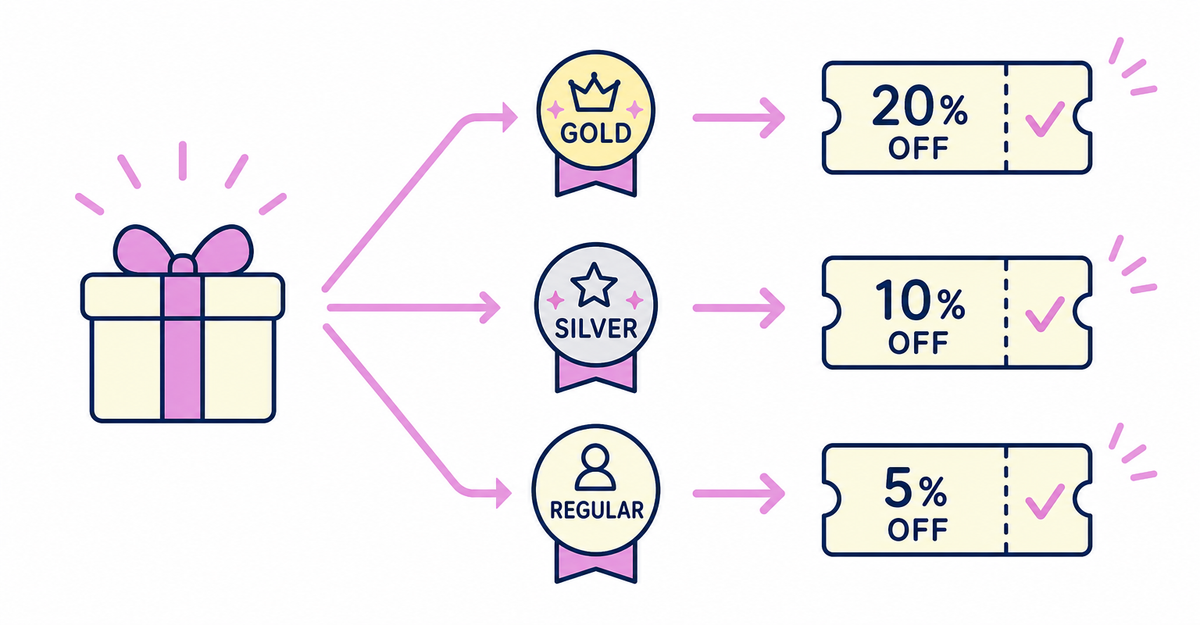
In short: You can combine the birth month customer metafield collected with Howdy's sign-up form and the membership tier customer metafield updated from purchase history by joining them with AND in a single customer segment condition. Create segments that match both a birth month and a tier, and set a discount code with a different discount rate as the eligibility for each one. Customers born in the same month can then get different rewards depending on their tier.
Howdy is an app that adds a sign-up form to Shopify's new customer accounts. The birth month collected with the sign-up form and the membership tier updated from purchase history are both saved in Shopify as customer metafields, so you can combine them on the customer segments screen using the same way of building conditions.
After following the steps in this article, you'll be able to create, for each tier, a segment of only the customers who match both a birth month and that tier, plus a discount code limited to that segment. For example, you can send separate coupons with a different discount rate for each tier, even to customers who were all born in July.
Key points
- You can combine the birth month and membership tier customer metafields by joining them with AND in a single customer segment condition
- Segment conditions can include AND or OR as connectors
- When you create a segment with different conditions for each tier, you can set discount codes with different discount rates as the eligibility, one for each tier
- If you add birth months as customer tags with Shopify Flow, you can combine a customer_tags condition with the tier metafield condition
- When you add tiers, create more segment and discount code pairs and repeat the same steps
How do you create a segment that combines birth month and tier?
To create a segment that combines birth month and tier, go to the customer segment editor and enter the birth month condition and the tier condition as a single condition, joined with the AND connector.
In the Shopify admin, go to Customers > Segments, click Create segment, and enter a condition such as metafields.custom.birth_month = 'July' AND metafields.custom.rank = 'Gold' in the editor field. When you add conditions to a filter, you can include OR or AND as a connector and keep building the filter. A customer segment is expressed in the ShopifyQL query editor as a query made up of three clauses, FROM, SHOW, and WHERE, and the filter, operator, and value you put in the WHERE clause become the segment's condition. You don't have to type conditions by hand: when you add a component in the editor, lists of suggested filter names, operators, and values appear, so you can also build the condition by choosing from the lists.
If you click Run query (「クエリを実行」) before saving, the number of matching customers and a list of them appear, so you can check who is included before you save. Giving each segment a name that shows its conditions (for example, "July birthdays – Gold") makes it easier to tell your tier segments apart later.
Sources: Howdy Help: "How to collect birth months and issue birthday discount coupons" (Japanese) / Shopify Help Center: "Creating customer segments"
Preparing the birth month metafield and the custom field on the sign-up form is covered in How to automatically issue birth-month coupons in Shopify: connecting customer tags and discounts, and preparing the membership tier customer metafield is covered in How to update membership tiers automatically by order count and amount spent in Shopify: customer segments.
How do you create coupons with a different discount rate for each tier?
To create coupons with a different discount rate for each tier, prepare one customer segment and one discount code per tier, split the eligibility by segment, and create each one as a separate discount code.
In the Shopify admin, go to Discounts, click Create discount, and choose a discount type. To take money off the order total, choose Amount off order. After you enter the coupon code, choose Customer segments in the Eligibility section, select the segment for the tier, click Add, and save. If you set a different discount rate on the discount codes for Gold, Silver, and Regular, you can send them as coupons with a different discount rate for each tier.
Using a customer segment as the eligibility lets you offer a discount to a whole group of customers with similar characteristics. To change who an existing discount code applies to later, choose a different segment in the same Eligibility section when you edit it.
The steps for sending the discount codes you create from a Shopify Messaging template are covered in How to automatically issue birth-month coupons in Shopify: connecting customer tags and discounts. Swap the recipient segment for the segment that matches each tier, and you can deliver each tier's coupon with the same sending steps.
Sources: Howdy Help: "How to collect birth months and issue birthday discount coupons" (Japanese) / Shopify Help Center: "Managing and editing discounts"
Can you combine tiers with birth months managed as customer tags?
Yes. If you add birth months as customer tags with Shopify Flow, you can join a customer_tags condition and the tier metafield condition with AND to make a single segment condition.
In a Shopify Flow workflow, combining the trigger "Customer created" with variables, conditions, and the actions "Run code" and "Add customer tags" lets you take the month from the birthday metafield when a customer signs up and automatically add a birth month customer tag. When you use this tag, the customer segment condition looks like customer_tags CONTAINS 'July' AND metafields.custom.rank = 'Gold'. customer_tags is a filter that narrows down customers based on their customer tags, and CONTAINS is an operator that targets customers with a tag that exactly matches the one you specify. Tags aren't case-sensitive.
Sources: Howdy Help: "How to add birth month customer tags for birthday campaigns" (Japanese) / Shopify Help Center: "Shopify customer segment filters"
How to build a workflow that adds birth month customer tags automatically is covered in How to automate post-sign-up tasks with Shopify Flow: tagging and metafield updates.
What do you do when you add tiers?
When you add tiers, create a new pair of a segment combined with the birth month and a discount code for each tier you add, repeating the same steps for each tier.
If you have several tiers, prepare as many segments and discount codes for customers born in July as you have tiers. To offer the same tiered rewards to customers born in August, create additional segments and discount codes with the birth month condition changed to "August", again one per tier. The more combinations of tiers and birth months you have, the more segments and discount codes you need to prepare.
You can deactivate discounts for combinations you've finished sending, even if they haven't expired. In the admin, go to Discounts, click the discount name, and choose Deactivate to pause it. Customers who enter a deactivated code see an error saying that no valid discount matching the code was found. If you'll use coupons for the same combination again the next year, you can reactivate expired discounts. When you reactivate a discount, its status goes back to Active, but no end date is set, so set the end date again for the next period you'll use it.
Sources: Howdy Help: "How to collect birth months and issue birthday discount coupons" (Japanese) / Shopify Help Center: "Creating customer segments" / Shopify Help Center: "Managing and editing discounts"
How do you check that your segment is set up correctly?
Create a test customer and enter July in their birth month metafield. Then check whether that customer appears in the "July birth month customers" segment you created.
When you click Run query (「クエリを実行」) in the customer segment editor, the number of matching customers and a list of them appear below the editor. Whether the test customer is in this list tells you whether the birth month condition is set up correctly.
Sources: Howdy Help: "How to collect birth months and issue birthday discount coupons" (Japanese) / Shopify Help Center: "Creating customer segments"
Wrapping up
Once you finish setting up rewards that combine birthdays and tiers, you'll be able to do these three things:
- Combine the birth month and membership tier customer metafields by joining them with AND in a single customer segment condition
- Create segments with different conditions for each tier and set discount codes with different discount rates as the eligibility for each one
- Combine birth months with tiers using the same AND structure, even when you manage birth months as customer tags with Shopify Flow
Related articles
- How to automatically issue birth-month coupons in Shopify: connecting customer tags and discounts
- How to update membership tiers automatically by order count and amount spent in Shopify: customer segments
Frequently asked questions
Try Howdy free for 14 days
When you combine the birth month and membership tier customer metafields in a single customer segment condition, you can send birthday coupons with a different discount rate for each tier. Our dedicated team creates your customer metafields, sets up the fields on your sign-up form, and places the blocks on your profile page for free.